

Tampilkan postingan dengan label Tutorial. Tampilkan semua postingan
Tampilkan postingan dengan label Tutorial. Tampilkan semua postingan
Selasa, 22 Desember 2015


Sabtu, 21 November 2015
Guides Break Down Sites Linked Terrorist Group Islamic State of Iraq and Syria (ISIS).

Anonymous hacker group released a guide to find and break down the websites linked terrorist group Islamic State of Iraq and Syria (ISIS).
Post-tragedy of shootings and bombings in the city of Paris, France, Anonymous does declare cyber war against ISIS. They invite people to participate in the campaign Operation Paris (OpParis) which aims to attack websites and social media belonging to terrorist groups.
In total there are three guidelines that they release into the canal Internet Relay Chat (IRC). First, the NoobGuide on how to hack, guide "Reporter" about how to create a Twitter bot that is useful to reveal the ISIS account, as well as guide "Searcher" on how to find sites related to ISIS.
Since last week, OpParis already succeeded in toppling more than 5,500 Twitter accounts associated with terrorist groups.
"Instead of just sitting on my hands (channel) chat or hang around doing nothing, you can get great things from different tools and guidance that we have given," wrote one member of the hacker group.
"Your contribution is very significant and we hope you will participate in all activities Op if possible, more is better," he added.
As reported KompasTekno of International Business Time, Thursday (11/19/2015), here's a guide to find sites that are associated with ISIS.
Video : "Anonymous Hacker Guide For Anyone To Help Take Down ISIS"
1. First, install Python application on your computer, unless you already have the program. Link Download : https://www.python.org/downloads/
2. Open Terminal or Command Prompt (Windows), and type in Python.
3. Then copy the content contained in this link or this link and paste it into the Command Prompt, and then press Enter.
Its contents are some search-related material as well as content owned ISIS terrorist group. The search materials can direct the search results to be more specific.
4. Then select a series of characters (it is advisable to use the "3") from the list. Examples can use 3 + 38 + 46.
5. After selecting, continue entering characters (without the quotes) "print (str3 + str38 + str42)" and copy the results to appear.
6. Paste the result in this link, and then analyzing the results in translation. It is advisable to take some Google Chrome features integrated translator.
7. Enter any valid address to the communication channel and we are going to do the next action.

Source : http://tekno.kompas.com
Selasa, 24 Maret 2015
Link Download My PC Defender 2015 V - 7.0 Build March 23, 2015

My PC Defender 2015 V - 7.0 Build March 23, 2015
Code Name : PITHO
© 2007-2015, e-library mediasoft , My PC Defender 2015
OUR WORK IS OUR DEDICATION TO THE PROGRESS OF INFORMATION AND COMMUNICATION TECHNOLOGY IN INDONESIA AND THE WORLD,IT'S HELPFUL AND GOOD TO YOU ALL.
KARYA KAMI INI KAMI DEDIKASIKAN UNTUK KEMAJUAN DUNIA TEKNOLOGI INFORMASI DAN KOMUNIKASI DI INDONESIA DAN DUNIA, SEMOGA BERMANFAAT BAGI ANDA SEMUA.
My PC Defender 2015 is an interface that will help you to destroy penganggu programs ( malware ) , securing and controlling your computer if your computer is currently experiencing interference against viruses, worms , trojans , exploits , rootkits , and others . My PC Defender 2015 is useful to make your computer in order to stay in the best condition to support your performance .
My PC Defender 2015 adalah sebuah antarmuka yang akan membantu anda untuk menghancurkan berbagai program penganggu (malware), mengamankan dan mengendalikan komputer anda jika saat ini komputer anda mengalami gangguan serangan virus, worm, trojan, exploit, rootkit, dan lain-lain. My PC Defender 2015 bermanfaat untuk menjadikan komputer anda agar tetap dalam kondisi terbaik untuk menunjang kinerja anda.

Introduction
Program Name
|
My PC Defender 2015 V - 7.0 Build March 23,
2015 Advanced Edition
|
Theme music
|
Crysis 2 Intro Video, Composer:
Hans Zimmer
|
Author
|
Yohanes Gitoyo, e-library mediasoft
|
Build Date
|
March 23, 2015
|
Release date
|
March 24, 2015
|
e-mail
|
e.library.mediasoft @ gmail.com
|
Official Blog
|
|
Facebook
|
Yohanes Gitoyo
|

My PC Defender New Features :
- New engine and new update software (update : March 23, 2015).
- Supported Operating Systems Microsoft Windows Xp, Vista, 7, 8.
- Supported Operating Systems 32 bit and 64-bit (available on My PC Defender 2015 Advanced Professional Version)
- Stealth system integration with SFX technology
- Destruction of malware from the computer boot process, with a Bootable Antivirus (Live DVD) BitDefenderRescueCD_v2.0.0_5_10_2010, build March 18, 2015.
- 18 system optimization tool and the latest spyware and malware destroyer of new (update: March 23, 2015)
- Tool newest destroyer rootkit (which can not be destroyed by any anti-virus)
- Fixed Bug
- Fixed bad link
- Rebuild other object in the new pocked
- Portable engine up to 90 % software include CD working in optimalize temporary file mode
- Program-based CD / DVD without installation process, be read only, so it is not possible in the block / in any type of malware infection.
- Destroy: viruses, worms, trojans, exploits, dialers, spyware, hijackers, adware, rogue.
- Program Microsoft Office 2007 substitute alternative (free) Libre Office 4.4
- Interface controls access to the Microsoft Windows operating system (without a wizard)
- Setting the computer as necessary to speed up computer performance
- Various alternatives best weapon destruction various types of viruses and malware
- Anti-virus with the ultimate portable crusher setting the highest
- Free for personal / home use / profit institution / business use.
Fitur Baru My PC Defender :
- Di dukung dengan mesin penghancur terbaru (update : 23 Maret 2015).
- Supported Operating Systems Microsoft Windows Xp, Vista, 7, 8.
- Mendukung Sistem Operasi 64 bit (khusus My PC Defender 2015Versi Advanced Profesional)
- Penerapan teknologi stealth terintegrasi dengan teknologi SFX
- 18 tool optimasi sistem dan penghancur spyware dan malware terbaru (update : 23 Maret 2015)
- Tool terbaru penghancur rootkit (yang tidak dapat dihancurkan oleh anti virus manapun)
- Perbaikan beberapa bug
- Perbaikan beberapa bad link
- Pembaharuan pemaketan beberapa obyek
- Mesin Portabel hingga 90 % program di dalam CD dan optimalisasi kinerja program dalam temporary file mode
- Penghancuran malware dari proses boot komputer, dengan Antivirus Bootable Antivirus (Live DVD) BitDefenderRescueCD_v2.0.0_5_10_2010, build March 18, 2015.
- Program berbasis CD / DVD tanpa proses instalasi, jadi baca saja (read only), jadi tidak mungkin di blok / di setiap jenis infeksi malware.
- Hancurkan: virus, worm, trojan, eksploitasi, dialer, spyware, hijackers, adware, rogue .
- Program Microsoft Office 2007 pengganti alternatif (gratis) Libre Office 4.4
- Antarmuka mengontrol akses ke sistem operasi Microsoft Windows (tanpa wizard)
- Mengatur komputer yang diperlukan untuk mempercepat kinerja komputer
- Berbagai alternatif jenis penghancuran senjata terbaik berbagai virus dan malware
- Anti-virus dengan crusher portabel utama pengaturan tertinggi
- Gratis untuk penggunaan pribadi / rumah menggunakan / laba lembaga / bisnis

Link Download.
Advisable to use program to download Internet Download Manager.
Untuk mendownload disarankan memakai program Internet Download Manager.
Advisable to use program to download Internet Download Manager.
Untuk mendownload disarankan memakai program Internet Download Manager.
File Name : my pc defender 2015 v7 adv.nrg ,
Total size : 1.803.547 KB (1,8 Gb)
The total file size DVD My PC Defender 2015 V - 7.0 Build March 23, 2015 are 1.803.547 KB (1,8 Gb) , what are the contents of the DVD ISO file to its size? Please read the Readme file below for the entire contents of the software, release date and other details on the download link below:
Total ukuran file DVD My PC Defender 2014 V-6.9 Build 23 Maret 2014 adalah 1, 33 Gb, apa saja isi file ISO DVD tersebut sehingga berukuran sedemikian besar ? Silahkan baca file Readme berikut untuk mengetahui isi keseluruhan software, tanggal release dan keterangan lain di link download berikut :


my pc defender 2015 v7 adv.part01.rar
Size : 51.200 KB
Link Download :
http://www.mediafire.com/download/sebgb8g59sqwtjh/my+pc+defender+2015+v7+adv.part01.rar
my pc defender 2015 v7 adv.part02.rar
Size : 51.200 KB
Link Download :
http://www.mediafire.com/download/000zn30td1410n0/my_pc_defender_2015_v7_adv.part02.rar
my pc defender 2015 v7 adv.part03.rar
Size : 51.200 KB
Link Download :
http://www.mediafire.com/download/kxjp2b83gcm2ayt/my+pc+defender+2015+v7+adv.part03.rar
my pc defender 2015 v7 adv.part04.rar
Size : 51.200 KB
Link Download :
http://www.mediafire.com/download/ed1d49ura12crzo/my_pc_defender_2015_v7_adv.part04.rar
my pc defender 2015 v7 adv.part05.rar
Size : 51.200 KB
Link Download :
http://www.mediafire.com/download/tqs79ea599roy9s/my_pc_defender_2015_v7_adv.part05.rar
my pc defender 2015 v7 adv.part06.rar
Size : 51.200 KB
Link Download :
http://www.mediafire.com/download/px14x8kulgww7py/my+pc+defender+2015+v7+adv.part06.rar
my pc defender 2015 v7 adv.part07.rar
Size : 51.200 KB
Link Download :
http://www.mediafire.com/download/5etg9lk53i99izm/my_pc_defender_2015_v7_adv.part07.rar
my pc defender 2015 v7 adv.part08.rar
Size : 51.200 KB
Link Download :
http://www.mediafire.com/download/izkwaoqva5lyz1z/my+pc+defender+2015+v7+adv.part08.rar
my pc defender 2015 v7 adv.part09.rar
Size : 51.200 KB
Link Download :
http://www.mediafire.com/download/b1f4r4a933ztmpr/my+pc+defender+2015+v7+adv.part09.rar
my pc defender 2015 v7 adv.part10.rar
Size : 51.200 KB
Link Download :
http://www.mediafire.com/download/7tiaiyda437lrm7/my+pc+defender+2015+v7+adv.part10.rar
my pc defender 2015 v7 adv.part11.rar
Size : 51.200 KB
Link Download :
http://www.mediafire.com/download/76ujp41fjipceu3/my+pc+defender+2015+v7+adv.part11.rar
my pc defender 2015 v7 adv.part12.rar
Size : 51.200 KB
Link Download :
http://www.mediafire.com/download/i3t5uy69saexbnm/my_pc_defender_2015_v7_adv.part12.rar
my pc defender 2015 v7 adv.part13.rar
Size : 51.200 KB
Link Download :
http://www.mediafire.com/download/ehju514jh69wikc/my+pc+defender+2015+v7+adv.part13.rar
my pc defender 2015 v7 adv.part14.rar
Size : 51.200 KB
Link Download :
http://www.mediafire.com/download/1lrqh0kjz3s3hcd/my+pc+defender+2015+v7+adv.part14.rar
my pc defender 2015 v7 adv.part15.rar
Size : 51.200 KB
Link Download :
http://www.mediafire.com/download/2bbn993ute73ag0/my+pc+defender+2015+v7+adv.part15.rar
my pc defender 2015 v7 adv.part16.rar
Size : 51.200 KB
Link Download :
http://www.mediafire.com/download/e7jzse42vdm54m3/my_pc_defender_2015_v7_adv.part16.rar
my pc defender 2015 v7 adv.part17.rar
Size : 51.200 KB
Link Download :
http://www.mediafire.com/download/4lbwco1mjdw0abz/my+pc+defender+2015+v7+adv.part17.rar
my pc defender 2015 v7 adv.part18.rar
Size : 51.200 KB
Link Download :
http://www.mediafire.com/download/8byg9n2r1lc2bhq/my+pc+defender+2015+v7+adv.part18.rar
my pc defender 2015 v7 adv.part19.rar
Size : 51.200 KB
Link Download :
http://www.mediafire.com/download/4cd3rcbn377p5i5/my+pc+defender+2015+v7+adv.part19.rar
my pc defender 2015 v7 adv.part20.rar
Size : 51.200 KB
Link Download :
http://www.mediafire.com/download/yjg1f4ucanz6fz4/my+pc+defender+2015+v7+adv.part20.rar
my pc defender 2015 v7 adv.part21.rar
Size : 51.200 KB
Link Download :
http://www.mediafire.com/download/ixmb1c7d2gm1nu7/my+pc+defender+2015+v7+adv.part21.rar
my pc defender 2015 v7 adv.part22.rar
Size : 51.200 KB
Link Download :
http://www.mediafire.com/download/1czkfijya19k2kt/my+pc+defender+2015+v7+adv.part22.rar
my pc defender 2015 v7 adv.part23.rar
Size : 51.200 KB
Link Download :
http://www.mediafire.com/download/ryepr2y6dieex5e/my+pc+defender+2015+v7+adv.part23.rar
my pc defender 2015 v7 adv.part24.rar
Size : 51.200 KB
Link Download :
http://www.mediafire.com/download/121bfm383mqkeka/my+pc+defender+2015+v7+adv.part24.rar
my pc defender 2015 v7 adv.part25.rar
Size : 51.200 KB
Link Download :
http://www.mediafire.com/download/qfntpdbvrqhslco/my+pc+defender+2015+v7+adv.part25.rar
my pc defender 2015 v7 adv.part26.rar
Size : 51.200 KB
Link Download :
http://www.mediafire.com/download/6z8noeo68shlo27/my+pc+defender+2015+v7+adv.part26.rar
my pc defender 2015 v7 adv.part27.rar
Size : 51.200 KB
Link Download :
http://www.mediafire.com/download/9seeq5537g75o37/my+pc+defender+2015+v7+adv.part27.rar
my pc defender 2015 v7 adv.part28.rar
Size : 51.200 KB
Link Download :
http://www.mediafire.com/download/71s136vc66bsigl/my+pc+defender+2015+v7+adv.part28.rar
my pc defender 2015 v7 adv.part29.rar
Size : 51.200 KB
Link Download :
http://www.mediafire.com/download/2jptp5eeae0w2u5/my+pc+defender+2015+v7+adv.part29.rar
my pc defender 2015 v7 adv.part30.rar
Size : 51.200 KB
Link Download :
http://www.mediafire.com/download/s28375p5sf6nkhj/my+pc+defender+2015+v7+adv.part30.rar
my pc defender 2015 v7 adv.part31.rar
Size : 51.200 KB
Link Download :
http://www.mediafire.com/download/9v503azb0r6gg3b/my+pc+defender+2015+v7+adv.part31.rar
my pc defender 2015 v7 adv.part32.rar
Size : 51.200 KB
Link Download :
http://www.mediafire.com/download/de7bh81b1prd7cn/my+pc+defender+2015+v7+adv.part32.rar
my pc defender 2015 v7 adv.part33.rar
Size : 51.200 KB
Link Download :
http://www.mediafire.com/download/api7yp8s28m4maz/my+pc+defender+2015+v7+adv.part33.rar
my pc defender 2015 v7 adv.part34.rar
Size : 51.200 KB
Link Download :
http://www.mediafire.com/download/jo0x7b5kf8bdqa0/my+pc+defender+2015+v7+adv.part34.rar
my pc defender 2015 v7 adv.part35.rar
Size : 43.514 KB
Link Download :
http://www.mediafire.com/download/qasxc6g16ze1a6l/my_pc_defender_2015_v7_adv.part35.rar
Senin, 15 Desember 2014
5 Steps to Getting rid of Malware "Drunk Girls" That Has staining your Facebook Account!

Malicious programs (malware) "drunk girl" has been circulating on Facebook since the beginning of last December 2014. This malware shaped trapping video with image preview video showing a woman in a drunken with vulgar poses.
Falsifying youtube
If the victim clicks on the Facebook wall posts Girls Drunk and happen to use the Google Chrome browser, it will then be redirected to a phishing site http://atasberita.info/gadis (according to watchlist Vaksincom, at the time of this article the manufacture of this site is no longer active). The phishing site will provide tmapilan are very similar to Youtube , but if pengaksesnya carefully and look at the website address then it is obvious that the site is accessible not YouTube but atasberita.info/gadis.
Do not forget the video look quite tempting because the vulgar given a message you need to have the plugin installed to watch this video. Click here to install the plugin.

According to the observations of network security company, Vaksincom, this malware seen already circulating on social media sites such since last December 3, 2014. Until now, Vaksincom suspect there are already more than 2,000 infected user account malicious programs.
One key to the success of this malware, according to Alfons Tanujaya, Vaksincom analyst, is the cleverness to avoid using a Facebook app that security teams are powerless to act malware removal. The cyber criminals, according to Alfons observations, using a technique that utilizes the Google Chrome extension.

Drunk girls in addition to post on your account will conduct a tag on your Facebook contacts repeatedly
If the victim to click on a video or message the plugin, it will appear confirming the installation of Google Chrome Extension (for the record instead of a plugin / codec but a Google Chrome Extension) with name Top News.

Top Extension News-installed if the user wants to see the videos Drunk Girl
In order for an unsuspecting victim installs malicious extension, after successfully installs Chrome Extension, this malware authors cleverly displays You Tube video Ԅrunk Girls Video Compilation 2013Ԡbagi victims of Youtube

Youtube videos displayed after installation evil Chrome Extension
If the victim had seen the video, most likely thought that the video was promised and the unsuspecting. Whereas in the computer has been lodged malware (in the form of Google Chtomer Extension) which will routinely conduct regular post Drunk girl from his Facebook account and in addition he will also perform tag on friends Facebook account concerned. Malware disguised as the extension will create a Facebook account victims do auto-posting malware "drunk girl" on the Facebook wall .
For the record, YouTube videos are shown actually does not require a plugin or Chrome Extension and by visiting the site directly Youtube videos will be seen.
Drunk Girl expel Malware from Your Computer
After reading the above article, you must already know that the culprit of all this is a Chrome Extension evil and to prevent automated posts the only way is to remove this Chrome Extension. Changing passwords Facebook or delete suspicious apps on Facebook will have no effect because the cause is not two things.
If already be a victim, Vaksincom advised to perform these steps to remove Chrome Extension evil:
- Go to the Google Chrome browser.
- Access Chrome Extension by typing: chrome: // extensions.

- Search Top News Extensions by name or other extensions are suspicious. Currently, in addition to other extensions Top News obtained by Malware Laboratory Vaksincom use IDM Integration Module name. If you see the name of the first laind extension beyond the name, Vaksincom would be grateful if you helped inform the Security Clinic Vaksincom https://www.facebook.com/groups/880787835284533/ to help other Facebook users in Indonesia who are victims of this malware.
- Click the image on the right bins and click the Delete button on the box Confirm Deletion to delete this malicious extension.

- Shut down and restart your Google Chrome. In order to maintain the possibility of unwanted, Vaksincom recommend you change your password and activate your Facebook account TFA Two Factor Authentication on all your important Kaun as primary email account, Facebook and Google in order to prevent theft and misuse of your account.
- After running the above steps, Vaksincom suggested for victims to immediately change the password Facebook account.
Composer: John Gitoyo, S Pd.
Source:
- http://vaksin.com/
- http://tekno.kompas.com/
Selasa, 03 Juni 2014

Senin, 26 Agustus 2013
Let's Fight With My PC Defender 2013 V - 8R !

This article I will guide you how to use our program: My PC Defender 2013 V - 8R, hopefully can help you trouble if your computer is infected various types of computer threats.
Artikel saya ini akan membimbing anda bagaimana cara menggunakan program kami : My PC Defender 2013 V - 8R, semoga dapat membantu kesulitan anda jika komputer anda terserang aneka jenis ancaman komputer.
Before we discuss how to use the program My PC Defender 2013 V - 8R!, Before we remember some things related to threats that can damage the health of your computer.
Sebelum kita membahas cara menggunakan program My PC Defender 2013 V - 8R!, sebelumnya kita mengingat beberapa hal yang berkaitan dengan ancaman yang dapat mengganggu kesehatan komputer anda.
You need to know there are different types of programs that may harm your computer, malicious programs that threaten your computer commonly referred to as Malware. Malware (short for the English term: malicious software, which means that suspicious software is a computer program that was created with the intent and purpose of the creator and is a program that looks for weaknesses of the software.
Perlu anda tahu ada berbagai jenis program yang dapat mengancam kesehatan komputer anda, program jahat yang mengancam komputer anda biasa disebut sebagai Malware. Malware (singkatan dari istilah Bahasa Inggris: malicious software, yang berarti perangkat lunak yang mencurigakan adalah program komputer yang diciptakan dengan maksud dan tujuan tertentu dari penciptanya dan merupakan program yang mencari kelemahan dari software.
Malware can disturb us as a result of its creation goals.
Consequences thereof are:
- Impair the performance of our computer's operating system, the computer becomes very slow, often hangs or restarts.
- Malware attacks cause the computer hardware performance increases dramatically, thus indirectly undermine our computer's hardware
- Our confidential data falling to the people who are not eligible
- We're losing control of our computer's performance (our computer into a zombie)
- E-mail us filled with spam ads
- When browsing the internet we are disturbed by pop-up ads
- When browsing the internet frequently stray into porn sites, fake company websites
- Merusak kinerja sistem operasi komputer kita, komputer menjadi sangat lambat, sering hang atau restart.
- Serangan malware menyebabkan kinerja hardware komputer meningkat drastis, sehingga secara tidak langsung merusak peangkat keras komputer kita
- Data rahasia kita jatuh kepada orang yang tidak berhak
- Kita kehilangan kendali terhadap kinerja komputer kita (komputer kita menjadi zombie)
- E-mail kita penuh dengan spam iklan
- Saat browsing internet kita diganggu oleh pop-up iklan
- Saat browsing internet sering nyasar ke situs porno, situs perusahaan palsu
The following features of your computer is not healthy due to malware attacks:
- computer often stops working (hangs) or sudden restarts itself
- A long boot time
- Empty hard drive memory (hard disk free space) suddenly full.
- There were changes in the configuration settings of Microsoft Windows
- Computer hardware will work higher, which can cause faulty computer hardware.
- We're losing control of our computer's performance, many system devices that can not be accessed, eg Run, Folder Options, Task Manager, Search, Registry Editor.
- While it is on-line internet message appears frequently, a particular image.
- Internet connection / network to be slow
- Suddenly swelled internet bills
- File we suddenly lost / hidden (hiden), change the file extension.
- Our confidential data stolen and used by an unauthorized person
- E-mail us filled with spam ads
- When browsing the internet we are disturbed by pop-up ads
- When browsing the internet frequently stray into porn sites, fake company websites
- etc.
- Komputer sering berhenti bekerja (hang) atau tiba-tiba restart sendiri
- Waktu booting menjadi lama
- Memory kosong hardisk (free space hard disk) tiba-tiba penuh.
- Terjadi perubahan setting konfigurasi Microsoft Windows
- Hardware komputer akan bekerja lebih tinggi, sehingga dapat menyebabkan perangkat keras komputer rusak.
- Kita kehilangan kendali terhadap kinerja komputer kita, banyak perangkat system yang tidak dapat diakses, misal Run, Folder Option, Task Manager, Search, Registry Editor.
- Ketika sedang on-line internet sering muncul pesan , gambar tertentu.
- Koneksi internet/ jaringan menjadi lambat
- Tiba-tiba tagihan rekening internet membengkak
- File kita tiba-tiba hilang/ disembunyikan (hiden), berubah ekstensi filenya.
- Data rahasia kita dicuri dan digunakan oleh orang yang tidak berhak
- E-mail kita penuh dengan spam iklan
- Saat browsing internet kita diganggu oleh pop-up iklan
- Saat browsing internet sering nyasar ke situs porno, situs perusahaan palsu
- dan lain-lain
How malware can spread and infect many computers to? Malware can spread and infect your computer healthy by:
- Media communications network, either a LAN network or the internet.
- Malware spreads via verbal communication 2 computers connected via a network (network) or the Internet.
- Physical access to a type of data storage media eg floppy disk, CD, USB flash memory or other data storage media.
- Malware spread via attachments (attachments) e-mails are ending up on e-mails that go into our computer.
- Media chat, we chat through regular exchange of files, files that we may receive certain malware infected.
- Security holes in the operating system or browser program, no program is perfect 100%, all programs have vulnerabilities (bugs) that can be used malware program. This security gap occurs in older programs / never updated, or the program is so widely used, so there are certain parties who deliberately seek to find security loopholes certain advantages.
Bagaimana malware dapat menyebar dan menginfeksi ke banyak komputer ? Malware dapat menyebar dan menginfeksi komputer sehat melalui :
- Media komunikasi jaringan, baik jaringan LAN maupun internet.
- Malware menyebar melalui komunikasi verbal 2 komputer yang terhubung melalui jaringan (network) atau Internet.
- Akses secara fisik suatu jenis media penyimpan data misal floopy disk, CD, USB Flash memory atau media penyimpan data lain.
- Malware menyebar melalui lampiran (attachment) e-mail yang terikut pada e-mail yang masuk ke komputer kita.
- Media chating, lewat chatting kita biasa tukar-menukar file, bisa saja file yang kita terima terinfeksi malware tertentu.
- Celah keamanan pada sistem operasi atau program browser kita, Tidak ada program yang sempurna 100 %, semua program memiliki celah keamanan (bug) yang bisa dimanfaatkan program malware. Celah keamanan ini terjadi pada program lama / tidak pernah di update, atau program tersebut begitu banyak digunakan orang, sehingga ada pihak-pihak tertentu yang sengaja mencari celah keamanan untuk mencari keuntungan tertentu.
Rabu, 03 Juli 2013
How to Upgrade to Windows 8 from Windows 7, XP and Vista.

How to upgrade windows 7 to windows 8, or upgrade Windows XP to Windows 8. Continued on tutorial windows 8, this time a little right windows8kita give a tutorial on how to" How to Upgrade to Windows 8 from Windows 7, XP and Vista". After 1.24 Billion Hours Public Test in 190 countries, Microsoft's new Operating System Windows 8 Officially Launched. So now it's time to upgrade to Next Generation Operating System Windows 8. To Use Windows 8 you can do a clean installation of Windows 8 or Upgrade from Windows XP, Windows Vista or Windows 7 to Windows 8.
There are two ways of Upgrade to Windows 8 from Windows XP, Windows Vista or Windows 7:
- Download Electronic Software: In this method we are able to upgrade to Windows 8 without using the installation DVD. We can Direct Download Windows 8 Setup from the Microsoft Web site.
- Through the Windows 8 installation DVD: In this method we upgrade to Windows 8 using Windows 8 Installation DVD.
The system requirements on Windows 8:
- Have processor 1 GHz or more
- 1 GB RAM (32-bit) or 2 GB RAM (64-bit)
- 16 GB available hard disk space (32-bit) or 20 GB (64-bit)
- DirectX 9 graphics device with WDDM driver 10 or higher.
OS support and retainable Products:
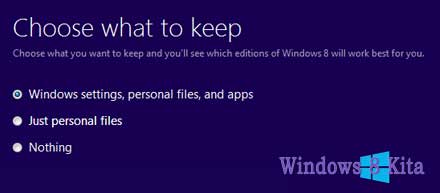
- Windows 7: Keeping Windows settings, personal files, and applications.
- Windows Vista: Maintaining Windows settings and personal files.
- Windows XP SP3: Keeping personal files only.
Note - Before you upgrade to Windows 8 Store all your important data to an external storage device.

A. Method 1 - Download Electronic Software
1 - Now you go to the Microsoft Web site and Search Details to Upgrade to Windows 8 in Special Price only $ 39.99, or about Rp 400,000 if in the rupiah.
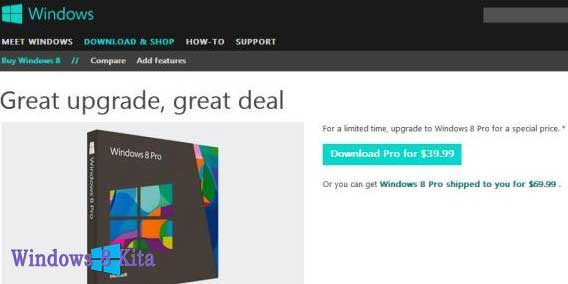
2 - After clicking Download Pro for $ 39.99 from Windows8-Pop UpgradeAssistant windows will appear. Save and Run-UpgradeAssistant.exe Windows8.
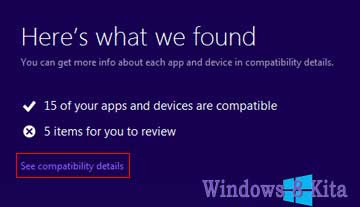
3 - Now Windows8-UpgradeAssistant will run compatibility checks to Inform you of compatible items, and items that are not compatible with your computer to Windows 8. You can check out the full details by clicking Check compatibility details.
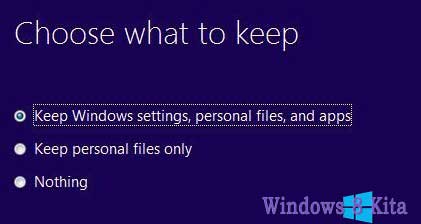
4 - After Checking system compatibility will be asked to choose what data you want to save or import If you are using Windows 7, then you can choose Windows Settings, Personal Files and Apps. But you also can Choose Nothing to Keep.
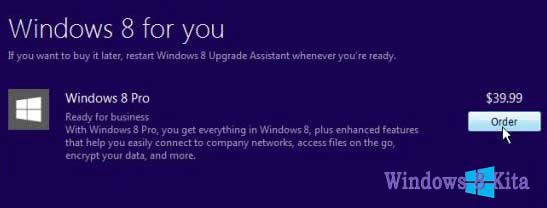
5 - Click Next and Place Your Order for Windows 8 Pro at a price of $ 39.99.
6 - You can also get the Windows 8 installation DVD with Pay an extra $ 14.99. Click the Checkout and Make Payment by Credit Card or Paypal and fill in the required details.
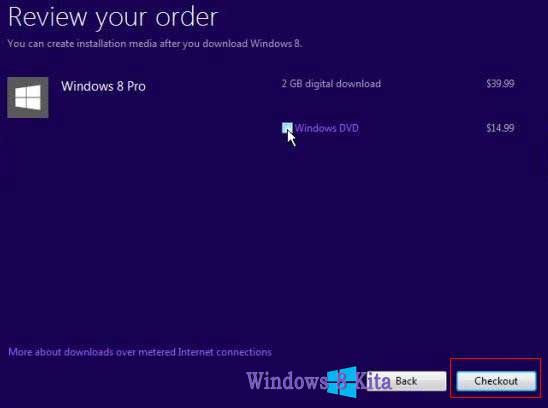
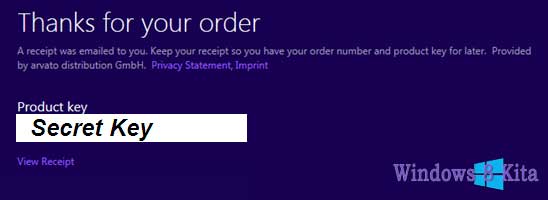
7 - After successfully completing your order, then you will get a Receipt billing and Windows 8 Product Key via email.
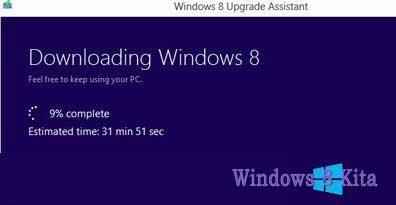
8 - Now Windows 8 upgrade assistant will begin downloading Windows 8 to your computer. It will take some time to download files 2 GB, depending on your Internet speed.
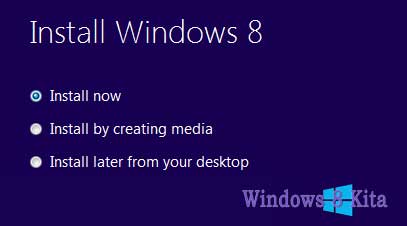
9 - Once the files have been downloaded, you can install Windows 8 soon to select Install now, or you can make a version of it on DVD media or USB by selecting Install by creating media.
10 - Now will tell you about things to consider before you can continue the installation. Uninstall first item is not compatible for Windows 8, and then click Restart to continue the installation.
11 - Now you will get the last change to make changes in the settings, if you are satisfied with your settings, then just click Install and Upgrade Your Computer to Start into the next generation Operating System Windows 8.
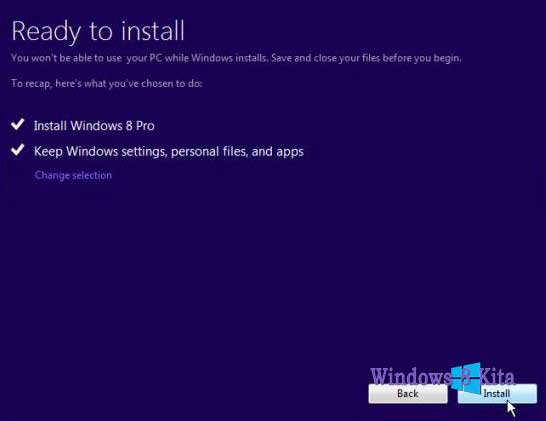
12 - Done!
B. Method 2 - Windows 8 Installation DVD
1 - First Enter Windows 8 Dvd Drive Installation to DVR or Blu-ray reader and run the setup.exe file.
2 - Windows 8 Setup to Begin Run.
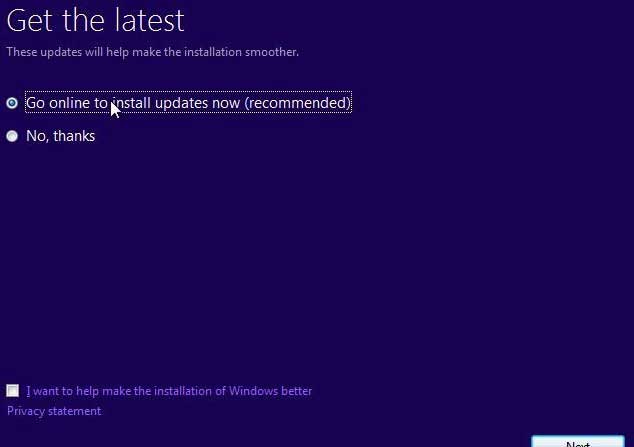
3 - Select Go to online to install the update now and click Next.
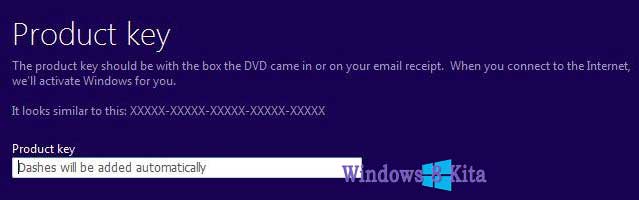
4 - Enter Product Key and click Next.
5 - Read and Accept Terams License and click Accept.
6 - Select the settings that you want to save during the upgrade and click Next.
7 - Now Microsoft will check that your system is ready to upgrade or not, and notify you if any item is not compatible with Windows 8.
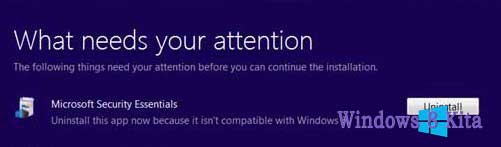
8 - If you find a program that does not fit the Uninstall incompatible item and then click Install to Start Upgrade.
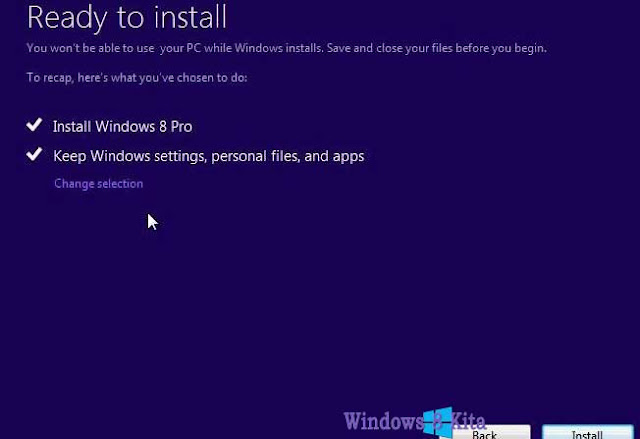
9 - Now the installation process will Start, Wait for the installation process is complete. During the installation process the system will require a reboot several times.
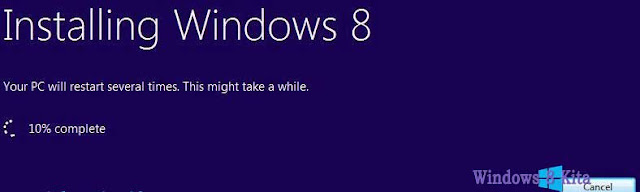
Important Note - Please do not perform other tasks during the installation and wait until Windows 8 setup is complete.
10 - Now Personalize process starts, you can Personalize your computer the same way we did during the installation of Windows 8 on the tutorial link below.
Congratulations upgrade has been done, and your files, settings, and applications have been migrated according to your settings.
Source : http://www.windows8kita.com/
Selasa, 02 Juli 2013
Clean htm and html injected Ramnit (HTM file repair / HTML Ramnit infected).

At this time many outstanding tools that can be used to eradicate Ramnit, but the tools to make a computer immune Ramnit Vaksincom just got. Techniques to make a computer immune Ramnit can only be found if you have enough flight hours in the field of eradication of the virus. If you feel this is enough, we inform you that there is still one important issue related to the Ramnit virus again and this problem can not be solved by any antivirus program. Does it matter?
When it comes to rooting Ramnit from the infected computer, these days many tools antivirus that can eradicate output. One of them is that you can use Norman Malware Cleaner for Ramnit that besides eradicate Ramnit which raged on your computer as well to reform the registry was changed by Ramnit.
If you think these two things are enough to overcome Ramnit (read our previous article), chances are you've never dealt with Ramnit. There is still one more thing that caused by Ramnit dizzying, especially regarding the web server containing htm or html file. As we know, one method is to inject the spread of Ramnit file htm / html which aims to spread itself through file htm / html is opened by a victim computer browser. So if he manages to inject webserver, then anyone who accesses the webserver will be infected by just opening the file htm / html on the webserver.
More sorry again if you are a webmaster or webdesigner's a lot to deal with htm or html file(re. Once the computer / server Ramnit infected then all htm and html files will be in the injection by Ramnit and the bad news is that to date antivirus program considers all htm and html files in the injection by Ramnit are like fugitives who flee to Colombia and will mercilessly in quarantine or delete. When in fact htm and html files can still be cleaned up so it does not need to start from scratch again.
Once again Vaksincom hand with expert coding of the town gudeg, Yayat make tools to save htm and html files in the injection by Ramnit. So there should not break if you delete antivirus program htm or html file you are, there is still Vaksincom. And the good news. The tools we provide Free to you. Besides having the ability to clean htm and html files of Ramnit, Vaksincom also include a special routine into the tools so that with just a single press of a button, you can make your computer immune from attack Ramnit. Hopefully with these tools in Indonesia spread of Ramnit can press.
Actually on the internet there are many good-hearted people like prof. Xavier. Tools htm and html file cleaning of injection Ramnit ever made by Jing Ge by name Malware Remover Script VB Dropper. (See figure)

Fix the HTML file with VB Script Malware DropperRemover
This tool is made specifically for the repair file HTML / HTM that have been infected Ramnit and from the results of testing the tool powerful enough HTM file repair / HTML Ramnit infected, but there are a number of requirements that must be met in order to run this tool on a computer which program should be installed Java. And this tool does not contain the "magic" that makes computers immune to Ramnit.
Link download VBSDropperRemover
Chanet Splitter II, capable of fixing file HTM / HTML were infected.
Maybe you still remember the Kespo virus, where the virus has the ability to inject Ms Office file that has the extension. Doc and. Xls. At that time many local antivirus vying to create tools that can repair files that are already on the injection by one of them is Kespo Tools Chanal SPLITTER works of Yogya Yayat man who was in publishing by Vaksincom in 2007 (http://www. vaksin.com/2007/0607/Kespo-gang_ref.htm).
Now with the emergence of Ramnit, he returned to make tools with names Chanet SPLITTER II are used to improve file HTM / HTML that has been infected with Ramnit. This tool can search for files HTM / HTML quickly to drive / folder that we specify and fix it so that the file can be reused without removing it.
Here are some of the advantages possessed by Chanet SPLITTER II are: (see figure )
- Remain FREE.
- Able to find and kill the Ramnit are active in memory automatically when Chanet SPLITTER on the run
- Able to repair registry altered by virus
- Ramnit was able to remove the master file
- PC protection order to be immune from Ramnit
- Protection that does not make the Ramnit virus file to USB Flash
- Finding and fixing file HTM / HTML Ramnit infected

Chanet Splitter II, capable of fixing file HTM / HTML were infected with Ramnit
Vaksincom thank you for the time, dedication and knowledge that have been donated in order to create tools Chanet SPLITTER II, may be able to help the victims who had been infected with Ramnit. If you want to participate and make tools exterminator virus, do not hesitate to contact us at info@vaksin.com, Vaksincom will give you the information you need support but are sorry we do not promise material rewards. Reward will you get is happiness can help computer users as well as victims of viruses and prayer sincere gratitude for helping fellow computer users.
Ramnit way to completely eradicate:
- Disconnect the computer from the network in order to prevent re-infection.
Use the tools Chanet Splitter II if you want to make your computer immune from Ramnit with one button at the same time improve the HTM file / HTML injection by Ramnit and can not be cleaned / the delete by antivirus / virus other cleaner. Download Chanet Splitter II of
http://www.vaksin.com/2011/0811/immune from ramnit / Chanet SPLITTERII.exe
IMPORTANT!!!
Chanet Splitter II is made in good faith to help the computer users who experience problems with Ramnit. PT. Vaksincom testing tools already do this on multiple computers with different operating systems like Windows XP, Windows Vista and Windows 7 and found no problems and the tools can be run well on OS-operating system in our lab test. BUT it is also possible that the tools we make are not compatible with the OS you're using and can cause system instability or data loss. Therefore, for the safety of your data we expect you to backup your data in the computer properly. PT. Vaksincom and tools manufacturer is not responsible for any damages caused either directly or indirectly, for the use of these tools.
- We include tools that is ONLY used to improve file HTM / HTML that has been infected with Ramnit alone. To clean the EXE file / DLL on the computer systems that are already infected Ramnit you can use Ramnit Cleaner Norman (special cleaner Ramnit) or Norman Malware Cleaner which can in http://www.vaksin.com/2011/0811/immune from ramnit / Norman_Ramnit_Cleaner.exe then scan including Full HDD Removable Media (USB Flash / External HDD) using updated antivirus to clean the EXE file / DLL is already infected. If Norman Ramnit Cleaner has expired, please download Norman Malware Cleaner is able to eradicate all viruses (not just Ramnit) of http://normanasa.vo.llnwd.net/o29/public/Norman_Malware_Cleaner.exe
- It is advisable to install the Windows security patch (MS10-046 KB2286198)
Source : http://www.vaksin.com/
How to make your PC Ramnit immune to attacks?

From the results of analysis currently Ramnit virus "always" use the master file with the same name ie "watermark.exe" although its storage location varies depending on the variant that infects the computer and create a file "Explorermgr.exe" which are in directory [C: \ Windows], the file "Explorermgr.exe" is created if Ramnit successfully infect file "Explorer.exe". Computer so that you do not become victims of violence Ramnit, here are some tips and tricks for your computer to be immune from attack Ramnit.
- Create a dummy folder (empty folder) with the name "watermark.exe" and "svchost.exe" in the usual location in the drill by a virus, then change the file attributes to Hidden, System and Read Only. This step is done so that Ramnit can not make the main virus file in the same location.
- Create file "Recycler" on each drive, then change the attributes to Hidden, System and Read Only. This step is done so that Ramnit can not create master files (such as EXE extension and CPL) file into RECYCLER. RECYCLER because this form of file (not a FOLDER) then it will not be able to make the Ramnit virus file in that location.
- Make 2 (two) registry key in the following location:
HKEY_LOCAL_MACHINE \ SOFTWARE \ Microsoft \ Windows NT \ CurrentVersion \ Image File Execution Options (see figure )
Key: Explorermgr.exe and watermark.exe
String value: Debugger
Type: REG_SZ
Data value: ntsd-d

String registry to block Ramnit that can not be active on the computer
- This step is done, so that the script / code which is on file virus Ramnit virus can not be executed, so that Ramnit can not be active in memory.
Protect Your USB Flash Media.
As noted previously, Ramnit also will spread itself by utilizing USB Flash media by making a virus file, the following tips and tricks for Ramnit can not create a master file into a USB Flash Media
- Especially for files with the extension EXE / DLL / HTM / HTML should compress using the program WinZip / WinRAR so that the virus does not infect the file, if necessary use a password.
- Create an empty folder with the name [autorun.inf]. In order for the [autorun.inf] is not removed by virus created an empty folder in the folder [autorun.inf] with a character that is not recognized by Windows such as CON and NUL. If the folder [autorun.inf] The failure will be deleted by displaying an error message. Should change the attributes to Hidden, System and Read Only (see figure )

Creating autorun.inf file

The error message when deleting a file autorun.inf
- Create an empty folder with the name "Copy of Shortcut to (1). Lnk", "Copy of Shortcut to (2). Lnk", "Copy of Shortcut to (3). Lnk" and "Copy of Shortcut to (4). lnk ", then change the attributes to Hidden, System and Read Only.
- Create file "Recycler", then change the attributes to Hidden, System and Read Only.
- Create an empty folder with the name MSO.SYS, then change the attributes to Hidden, System and Read Only.
Source : http://vaksin.com/
Minggu, 23 Juni 2013
How to install and run the Sophos Conficker Removal Tool on a single computer ?
What malware does the Sophos Removal tool remove?
Details of the specific pieces of malware that this tool will remove are listed on the Sophos Website as follows:
Mal/Conficker-A, Mal/Confick-Dam, Mal/Conficker-B, Mal/ConfInf-A, Troj/ConfData-A, Troj/ConfDr-B, Troj/ConfDr-C, Troj/ConfDr-Gen , W32/ConfDr-Gen, W32/Confick-A, W32/Confick-B, W32/Confick-C, W32/Confick-D, W32/Confick-F, W32/Confick-G, W32/Confick-H, W32/Confick-I, W32/Confick-K, W32/Confick-L, W32/Confick-M, W32/ConfikMem-A, W32/ConfikMem-B
How to install and run the Conficker removal tool on a single computer
- Download the file Sophos Conficker Removal Tool.msi and save it to a convenient location on your computer, e.g. your Desktop.
- Double-click the icon and work through the installation wizard. After you have clicked 'Finish' a shortcut is placed on your Desktop.
- You have 3 options for running the tool:
- The installation GUI allows you to run it immediately.
- You can run the GUI version by double-clicking the icon on your desktop.
- There is a command line version which can be found in Program Files\Sophos\Sophos <threat name> Cleanup Tool\cli.exe. NOTE: You may prefer to run the tool when your computer is not busy with other tasks. Details on how to run it as a script are given in the article Deploying the Sophos Removal tool over a network.
- When you open the GUI version of the tool, it displays the 'Sophos Removal Tool' window. It displays the name and location of the log file it is creating.
- Click 'Start Scan' and it will scan the predefined areas for malware. If it finds any malware it will automatically remove it following the scan. The software will prompt you if a reboot is required following malware removal.
If you want to deploy the tool across a network,
- Download the tool as described above.
- Read the following section of this article, entitled 'IMPORTANT'.
- Go to the knowledgebase article Deploying the Sophos Removal tool over a network for instructions on deploying the tool across a network.
IMPORTANT
You may see any of the following possible issues:
- Occasional failure to remove Conficker service key: The tool will report a failure to cleanup but only a service key will remain. This happens when Conficker has executed for the first time and there has not been a reboot since. It happens because the service key, which has odd permissions restricted to the local user, has not yet been registered in the Service Control Manager. The OS does not have complete knowledge about this service until the next reboot so de-registering the service may not function as expected. Once a reboot has occurred the service is registered and there are no issues with complete removal. Please note that the existence of stray service entries that do not point to Conficker are not detrimental to the functioning of the computer. The same information applies to Sophos Anti-Virus. NB: If the binary component of Conficker has already been removed, the service will not be removed because detection of the service is context-based because it references Conficker.
- Removal of scheduled tasks: The Conficker removal tool removes scheduled tasks based on context, i.e. they point to Conficker. If the Conficker binary has been removed already then the context for the scheduled tasks is lost and so they will not be removed. We do this context-based cleanup to ensure that we do not remove scheduled tasks which are not created by Conficker.
- Conficker coming back: The Conficker removal tool does not have on-access scanning. It will not prevent other infected computers on the network from re-infecting the computer which has just been cleaned with the tool. This is a common occurrence with network worms so you must ensure that you take precautions to prevent re-infection form other computers on your network. For more advice on this, refer to the Knowledgebase article Sophos Anti-Virus for Windows 2000+: Removing W32/Confick and Mal/Conficker, see the sections describing how to lock down your network and prevent re-infection.
Uninstalling the tool
Following use, you can remove the tool using Windows Add/Remove programs.
Source : http://www.sophos.com/
Removing W32/Confick and Mal/Conficker with Sophos Anti-Virus

This article describes how to remove Conficker from your computers if you have Sophos Anti-Virus installed. You can download the Sophos Conficker cleanup tool from the HERE:
Issue
This article describes the actions of the viruses of the Confick family on your computers and explains how to remove them.
Please note: you must follow all of the steps in this article carefully in order to completely remove the Conficker virus outbreak on your network. This virus replicates itself very easily and re-infects computers and shared network folders. These instructions, when followed carefully, will remove the virus outbreak completely.
- Refer to the Sophos Security webpages for more information about this family of viruses.
- Confick viruses spread through the MS08-067 vulnerability.
- Microsoft released a critical security patch for this in October 2008: http://www.microsoft.com/technet/security/Bulletin/MS08-067.mspx
- Further information is also given at the bottom of this article.
- Ensure that all the computers on your network have anti-virus software installed and that their protection is up to date.
About the W32/Confick and Mal/Conficker
Variants of this malware may be known by other names including: W32/Confick-A, W32/Confick-B, W32/Confick-C, Mal/Conficker-A, W32/CONFICKMEM-A, W32/CONFICKMEM-B, W32/CONFICK-D, WORM_DOWNAD.AD, W32/Conficker.worm, Worm:Win32/Conficker.gen!A, Worm:W32/Downadup, Net-Worm.Win32.Kido.
There are three main infection methods that Confick can use:
- Spreads via the MS08-67 exploit
In most cases, this is how the virus gets on the network in the first place. The virus takes advantage of the Microsoft exploit:
- A copy of the worm is created in the Temporary Internet files folder with a JPG or PNG extension. (These are the first files to appear on the system when it is infected.)
- A dll file is created within the System32 folder, e.g. C:\Windows\System32\amcophji.dll
- A service is created to run the dll file
- It runs as a handle within one of the svchost.exe processes - normally the same one running Netsvcs
You can stop it spreading by this method by applying the patch and cleaning the computer.
- Spreads via Windows file sharing
Once on the network the virus can spread using the Microsoft exploit (above) or by accessing the file and admin shares on the network.
When it infects a computer it creates a file with a random name and a random extension within the System32 folder. A scheduled task (running as SYSTEM) will execute this file using rundll32.exe.
- A dll file is created with a random extension and name within the System32 folder - e.g. C:\Windows\System32\zdtnx.g
- A scheduled task(s) is created to run the above randomly named file using rundll32.exe
- The task(s) is called AT*.job where * is a sequential number
- It will be running within a rundll32.exe process
- There will be one rundll32.exe process running for every scheduled task that has been created
The Sophos on-access scanner will prevent re-infection as it prevents these scheduled tasks from running. The worm DLL file may be present on disk, but it will not be allowed to run as long as the on-access scanner is enabled.
- Spreads via removable media such as USB drives
When a removable drive is connected to an infected computer, the Conficker worm will
- create a copy of itself in the RECYCLER\S-x-x-xx-xxxxxxxxxx-xxxxxxxxxx-xxxxxxxxx-xxxx folder on that drive (where x consists of random numbers)
- drop the file autorun.inf in the root director of the drive.
These files and directories are hidden.
The autorun.inf file will cause the worm to run when the drive is connected to a Windows computer with autoplay enabled, or when the drive is opened in Windows Explorer.
When the worm runs from a removable drive, it will copy itself to the Windows\system32 directory with a .dll extension and set up service registry keys in the same way as the previous infection vectors.
What to do
This is a four stage process, and you must perform all of these steps
- Scanning Preparation
- Quarantining the network to prevent the spread of infection
- Locking down services to prevent spread/execution - using Windows Group Policy
- Cleaning up the infections
You are advised to also read the knowledgebase article Sophos Anti-Virus: Tracking and finding Conficker infections.
Ensure that the settings described in the following procedure are applied to all computers. This will allow the Sophos on-access scanner to prevent the virus, whether as a service or a task, from loading on the computer .
Refer also to Current major threats: Conficker, Virtumundo
1. Scanning Preparation
- Patch ALL of the computers (infected and uninfected) with MS08-067 (KB958644)
- Set the On-access scanner policy within the Enterprise Console to:
- On-Read
- On-Write
- Deselect 'Automatically Cleanup'
- Choose 'Do Nothing' as the actions OR 'Deny Access'.
- Ensure HIPS is set to:
- Detect Suspicious Behaviour = True
- Detect Buffer Overflow = True
- Alert Only = False
- Enable the scanning of all files during on-demand scans:
- Open the Anti-Virus policy(ies) on the Enterprise Console
- Click on 'Extensions and Exclusions'
- Tick the box to scan all files
- Press ok
- Ensure that the Anti-Virus policy has been applied to ALL computers
- In some cases you will need to reboot a computer. (See step 4b below.)
2. Quarantining the network to prevent the spread of infection
Do one of the following:
- Disconnect all infected computers from the network by unplugging their network cables.
OR
- Use client-side firewalls to prevent network access:
If using Sophos Client Firewall (which must be installed on all client computers - see your licence to ensure you are able to use the product):
- Open Enterprise Console and edit the Firewall policy
- Go to the LAN tab and deselect the NETBIOS options for all network connections
If using Windows Firewall via Group Policy:
- Edit your Group Policy for ALL computers
- The setting can be found under Computer Configuration|Administrative Templates|Network|Network Connections |Windows Firewall|Domain Profile|Windows Firewall: Allow file and printer sharing exception
- Double click and choose to disable.
NOTE:
Using either of these methods could prevent Sophos updates from being downloaded, we suggest that you either :
- Add an exception to allow file and print sharing access to your EM Console server/update servers
- Setup a WebCID to allow updates to be carried out through HTTP, please see article: 38238
3. Locking down services to prevent spread/execution - using Windows Group Policy
- Disable Task Scheduler Service - (note, scheduled scans will not work after this, you can still use the right-click 'Full System Scan' from the Enterprise Console.)
- Computer Configuration|Windows Settings|Security Settings|System Services
- Locate the 'Task Scheduler' Service
- Define this policy.
- Set to 'Disabled'
- Disable USB Autoplay. This must be done correctly as described in the Microsoft knowledgebase http://support.microsoft.com/kb/953252. If this is not done correctly the worm may be able to execute if the USB drive is opened in Explorer or double-clicked from My Computer.
All of the above can be re-enabled when you are satisfied that your entire system is clean and that they have all been patched against MS08-67..
4. Cleaning up the infections
Depending on which action you took in 2 above, do one of the following:
Computers have been disconnected:
- Logon with local administrator rights. Do not log on as a domain administrator.
- Open Quarantine Manager, select all items and click 'Clear from List'.
- Run a full system scan. One of the following will result:
- If the full scan reported an instance of W32/ConfickMEM-A or W32/ConfickMEM-B, clean up this item from the QM and then immediately perform another full scan and cleanup again. W32/ConfickMEM-A or W32/ConfickMEM-B indicates an active Conficker infection on this computer, so it should be cleaned up as a priority compared to other Conficker detections. This cleanup will terminate the worm in memory and allow the second full scan to detect the worm files on disk.
- If the full scan reported that one or more files in the Windows\system32 directory could not be scanned (Error text: '<filename> returned SAV Interface error 0xa0040210: The file could not be accessed') and there were no instances of W32/ConfickMEM-A or W32/ConfickMEM-B reported in the scan, ensure the on-access scanner is enabled as described above, then reboot the computer and perform another full scan.
- This computer may have an active infection of Conficker that is preventing the file on disk from being scanned. Rebooting allows the on-access scanner to stop the worm loading and allow the file to be scanned.
- Run cleanup from the quarantine manager once the scan has finished.
- Cleanup may prompt for a reboot in order to remove all the components.
- Scan the machine again to ensure that it is clean.
In Enterprise Console:
- Acknowledge alerts and errors within the Enterprise Console.
- Scan all computers at the same time by right-clicking on them in the console and selecting 'Full System Scan'.
- Run cleanup on all computers by right-clicking and selecting 'Cleanup threats'.
- Cleanup may prompt for a reboot in order to remove all the components.
- Scan the computers again.
- Cleanup again if required.
5. Re-infection
If Windows file sharing cannot be disabled, or if an infected computer or USB stick is introduced into the network, reinfection of computers that have already been cleaned up may occur. In these cases, computers running the Sophos on-access scanner are protected against reinfection but will still receive a copy of the worm DLL via file sharing from the infected computer.
These instances will be reported in the Quarantine manager as on-access detections and should be treated as a secondary concern; priority should be given to cleaning up computers with an active detection of Conficker as described above.
Once all computers with an active Conficker infection (i.e. W32/ConfickMEM-A or W32/ConfickMEM-B, as described in Section 4, step 3,1) have been cleaned up, the worm DLLs on uninfected computers can be removed via a full scan and cleanup, and will not return.
Further background information
Refer to the Sophos Security webpages for more information about this family of viruses.
Confick viruses spread through the MS08-067 vulnerability. Microsoft released a critical security patch for this in October 2008: http://www.microsoft.com/technet/security/Bulletin/MS08-067.mspx
- To check if the patch is installed, go into Add\Remove Programs and look for KB958644 (ensure that the 'Show updates' box at the top is ticked).
- Enable HIPS and BOPs and make sure that "Alert only" is switched off. This should prevent re-infection, however HIPS does not block the virus from running.
- This infection also spreads via network shares. It tries to crack passwords of user accounts using a crude dictionary. If an account cannot be cracked it may end up being locked out because of incorrect password attempts (depending on how Active Directory has been set up).
- The virus seems to copy a random file name with random file extension to the c:\windows\system32 folder. It also creates a scheduled task named ATx.job - where x is a number. The scheduled task seems to run the file in the system32 folder.
- The virus may try to contact a number of websites, some of which are legitimate
- It will try to obtain updates for itself from various domains. The use of client firewalls will greatly help to stop the spread of the virus.
- This virus will also spread via USB drives and other removable devices, please ensure that they are scanned and cleaned before using them again.
- You can prevent the creation of new scheduled tasks via a group policy using the following article- http://www.microsoft.com/technet/prodtechnol/windows2000serv/reskit/regentry/92819.mspx?mfr=true
- Using the firewall methods above will prevent Sophos updates from working. There are two ways around this:
- Setup the secondary server details within the Enterprise Console's updating policy so that the computers can update from Sophos - see article: 12354
- Add an exception to the firewall policies to allow File and Print sharing connections to the EM Console/EM Library server(s). This can cause the server(s) to be infected as client computers are able to access them.
Source : http://www.sophos.com/.
Langganan:
Postingan (Atom)